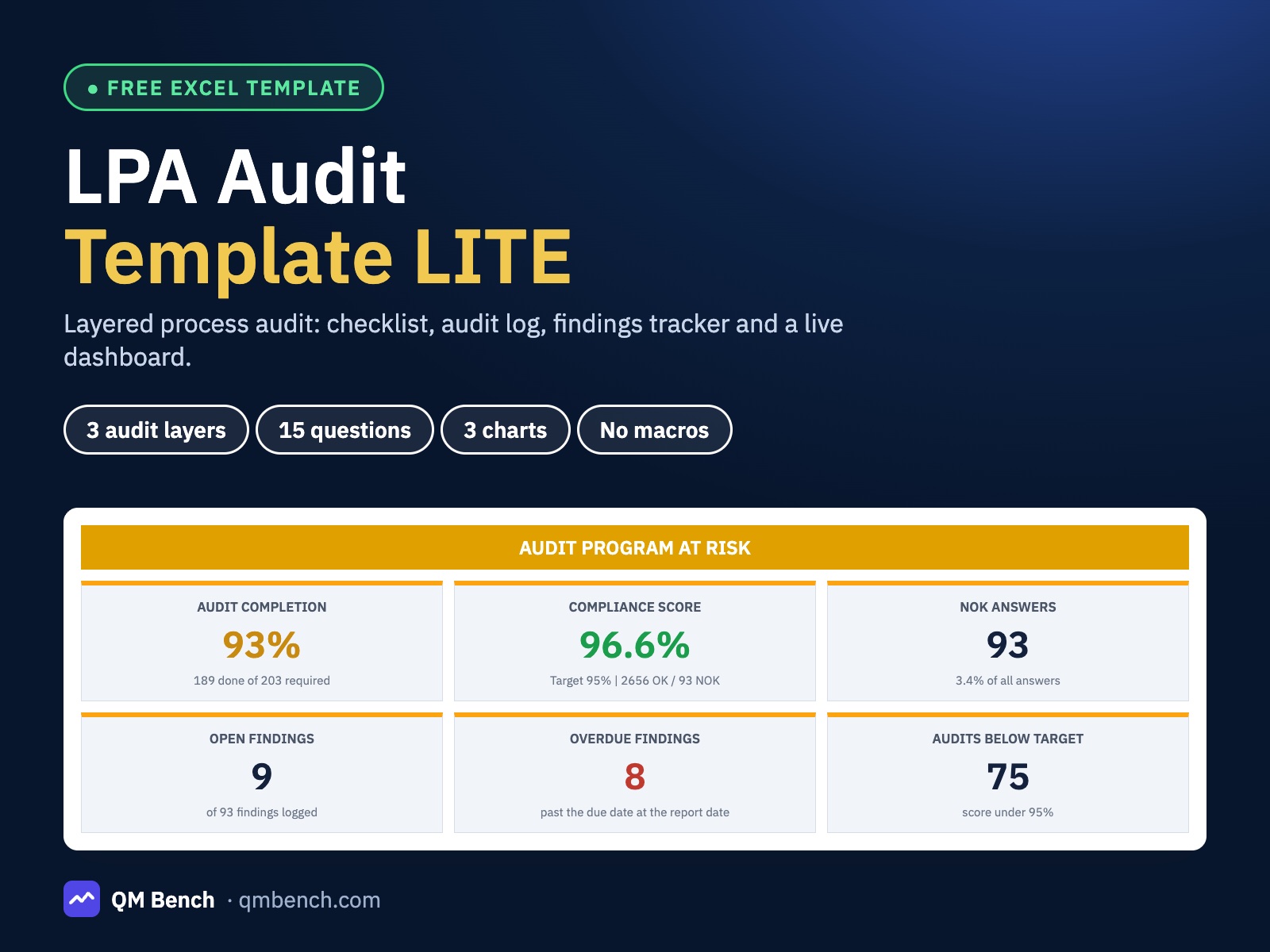
Excel template
LPA Audit Template LITE
Layered process audit with checklist, findings tracker and dashboard in Excel
A free layered process audit workbook: three audit layers, a 15-question checklist, an audit log with automatic score and PASS / FAIL, a findings tracker with overdue flags and a dashboard with a status banner, six KPI tiles and three charts. Opens with an example plant, no macros.
- 3 audit layers, 6 areas and 8 auditors
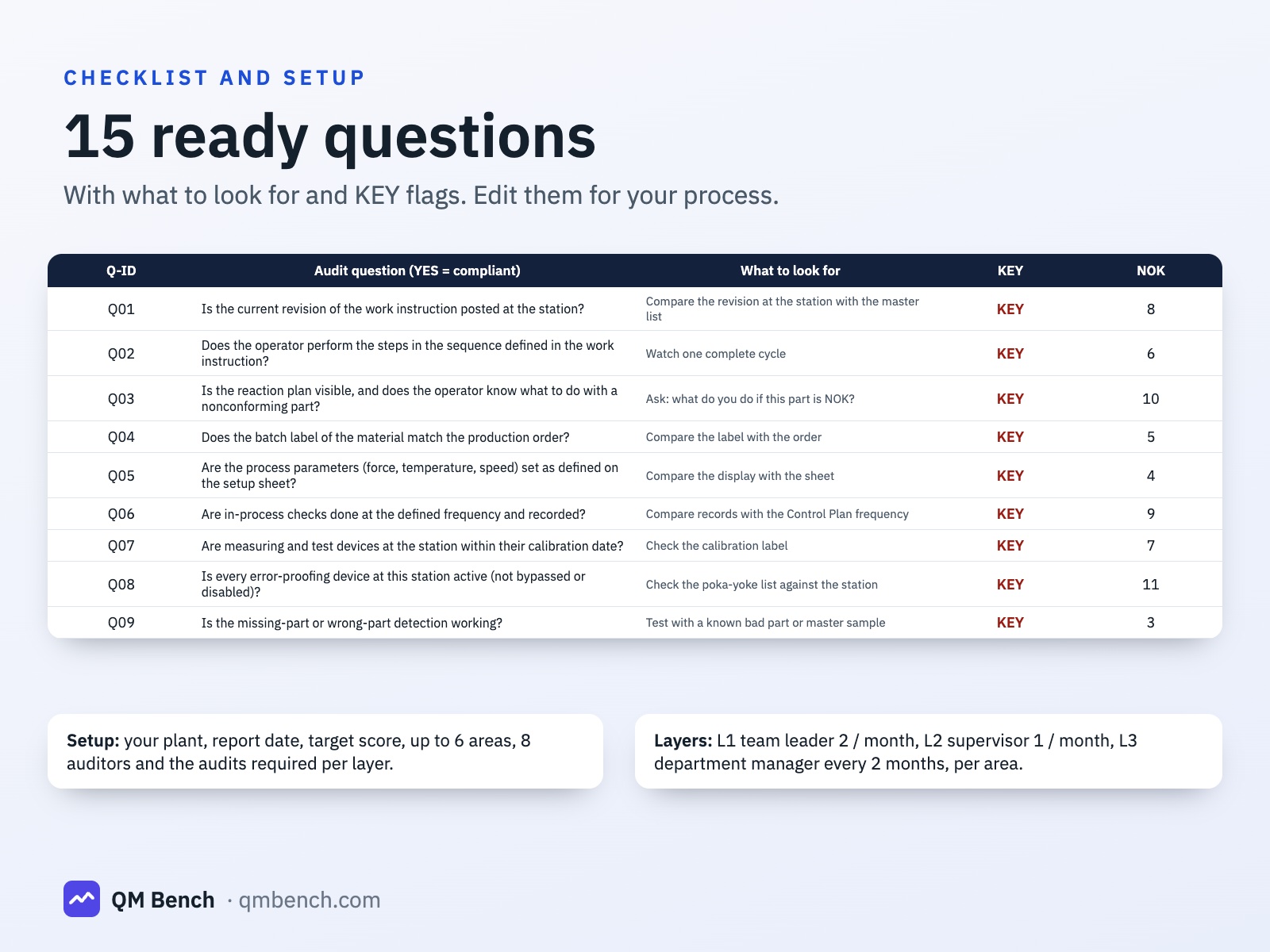
- 15 ready questions with what to look for and KEY flags
- Audit score and PASS / FAIL calculated for every audit
- Findings tracker with overdue and due-soon flags
- Dashboard with status banner, 6 KPI tiles and 3 charts
- No macros, example plant included
What is inside
- 1
Start Here
Five steps to your first audit and the comparison with the FULL system.
- 2
Dashboard
ON TRACK / AT RISK / BEHIND banner, six KPI tiles, the layer table, the area table and three charts.
- 3
Setup
Company, report date, target score, up to 6 areas, 8 auditors and the audits required per area and month for each layer.
- 4
Checklist
15 questions with category, what to look for and a KEY flag. Edit them freely.
- 5
Audit Log
400 ready rows: date, area, layer, auditor, shift and OK / NOK / N/A per question. Score, result and a check for NOK answers without a finding.
- 6
Findings
300 ready rows: audit and question, containment, root cause, corrective action, owner, due date, status and an automatic flag.
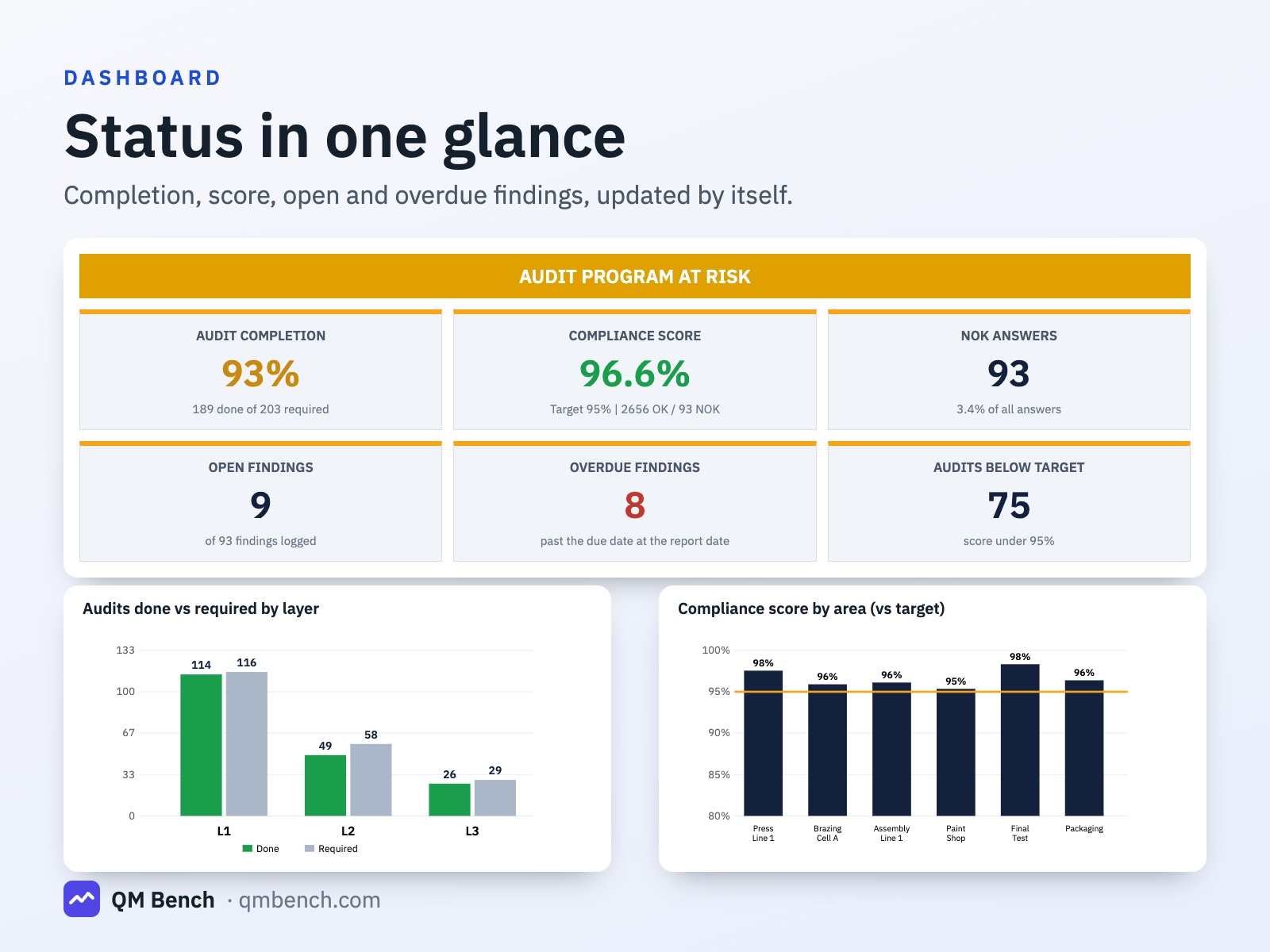
Status in one glance
The banner tells you whether the audit program is on track, at risk or behind. Six tiles show completion, compliance score, NOK answers, open findings, overdue findings and audits below target.
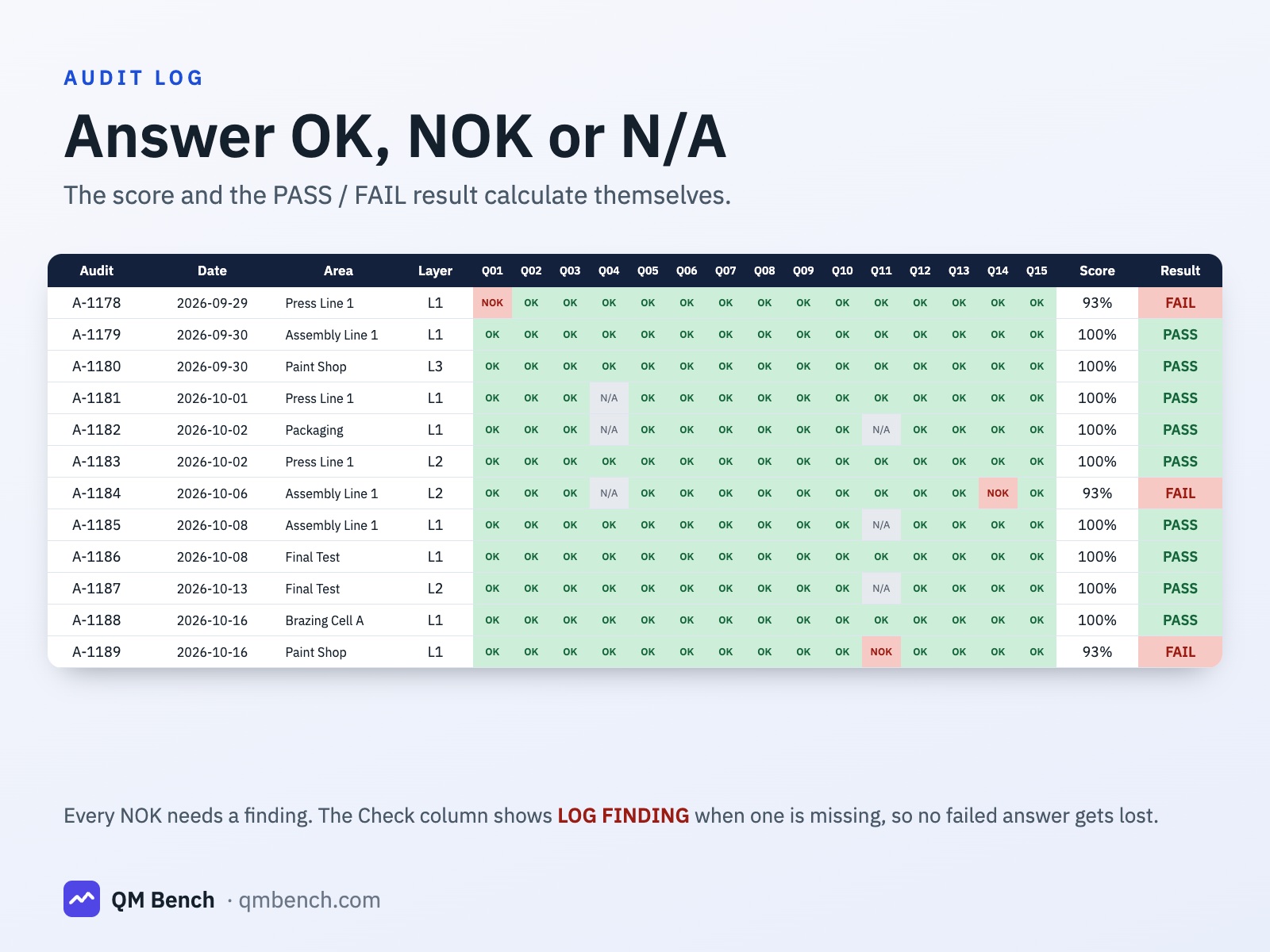
Answer, score, done
Pick the area, the layer and the auditor, then answer OK, NOK or N/A for each question from a dropdown. The score and the PASS / FAIL result against your target calculate themselves.
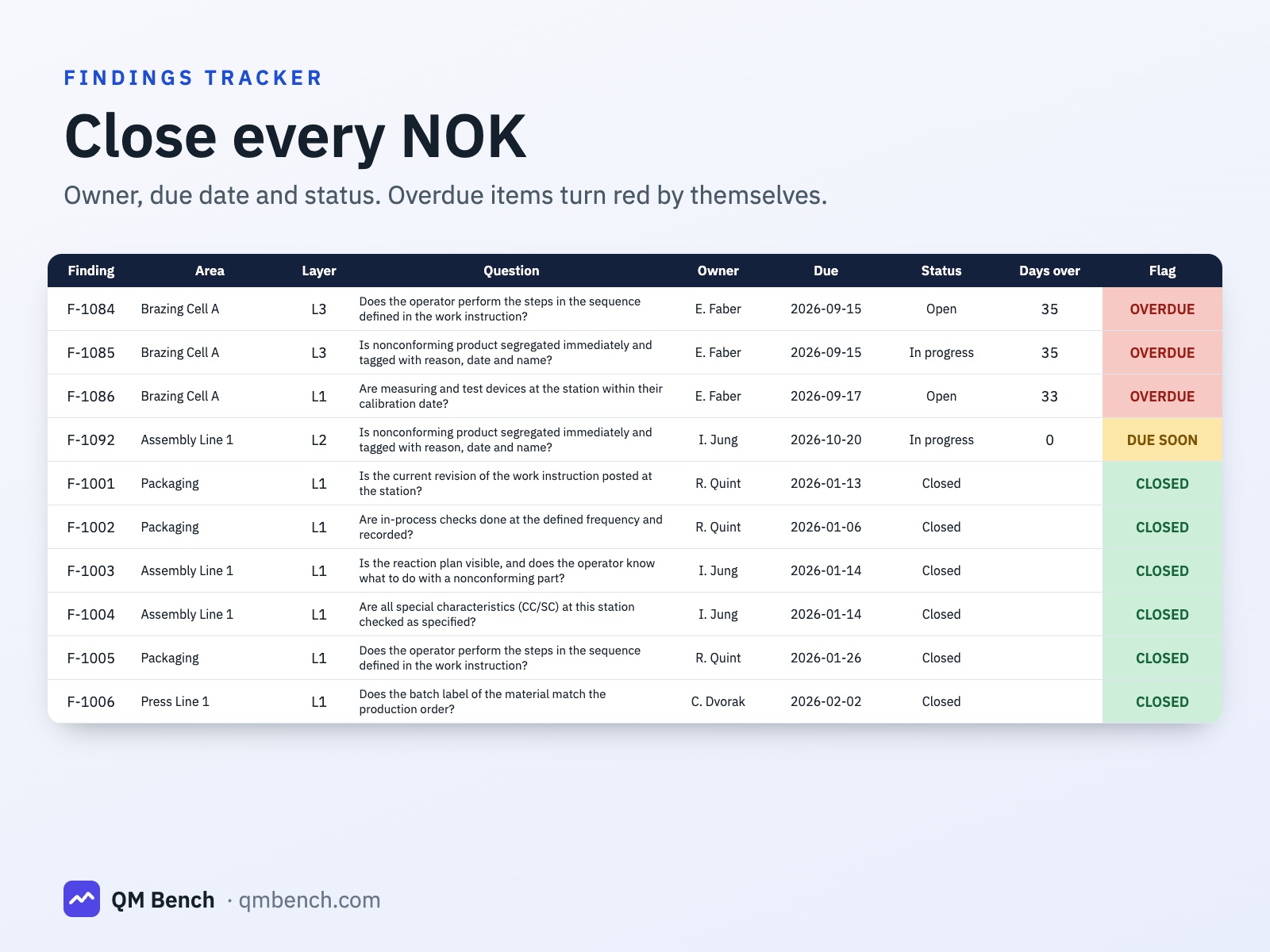
No failed answer gets lost
Every NOK needs a finding. The Check column shows LOG FINDING when it is missing. In the Findings tab the audit date, area, layer and question text fill themselves, and overdue items turn red from the report date.
Made for your process
Replace the 15 questions, the areas, the auditors and the layer targets. The required audits are pro-rated to the report date, so the completion figure is fair at any point in the year.
Honest scope
LITE has three layers and one checklist for all areas. It has no coverage matrix, no repeat-finding escalation, no special focus audits and no trends. The FULL system on Etsy adds them.
LITE vs FULL version
LITE is free here. The FULL version is a paid download in our Etsy shop.
| Feature | LITE (free) | FULL ★ |
|---|---|---|
| Audit layers | 3 (L1 to L3) | 5 (L1 to L5) |
| Senior-management participation tracked separately | – | ✓ |
| Areas / auditors | 6 / 8 | 15 / 60 |
| Questions | 15 | 120 in 12 categories, 10 checklist sets |
| Audit rows / findings | 400 / 300 | 3,000 / 1,500 |
| Audit score, PASS / FAIL, NOK without finding check | Yes | ✓ |
| Findings with owner, due date, overdue flags | Yes | Yes, plus root cause and effectiveness check |
| Dashboard | Banner, 6 tiles, 3 charts | Month filter, 8 KPI tiles, 6 charts |
| Coverage matrix (area x layer) | – | ✓ |
| Repeat-finding escalation | – | ✓ |
| Special focus audits after a complaint | – | ✓ |
| 12-month trends and area heatmap | – | ✓ |
| Printable audit form | – | ✓ |
Details
- Format
- Microsoft Excel .xlsx, 6 sheets
- Works in
- Excel 2010 or newer (Windows, Mac)
- Macros
- None
- Audit layers
- 3 (L1 to L3)
- Areas / auditors
- 6 / 8
- Questions
- 15, editable
- Rows
- 400 audits, 300 findings
- Sample data
- Included, clear the yellow cells to start
- Standard
- Principles of AIAG CQI-8, independent, not an AIAG document
- Licence
- Free for use in your company
Frequently asked questions
›Is it really free?
Yes. Download it and use it in your company. No sign-up and no e-mail address needed.
›Is this an official AIAG CQI-8 document?
No. It is an independent template that follows the principles of the AIAG CQI-8 layered process audit guideline. Always check your customer-specific requirements.
›How do I remove the example data?
Clear the yellow cells in the Audit Log and the Findings tab, then enter your company, areas, auditors and layer targets in Setup.
›How is the number of required audits calculated?
Audits per area per month for each layer (Setup) x the number of areas x the months elapsed up to the report date. The months are the full months since the program year start plus the day of the month divided by 31.
›Does it work in Google Sheets or LibreOffice?
It is built for Microsoft Excel 2010 or newer. It has not been tested in Google Sheets or LibreOffice.
›What does the FULL system add?
Five layers with senior-management tracking, a coverage matrix, repeat-finding escalation, special focus audits after a complaint, a month filter, trends with an area heatmap, 120 questions with ten checklist sets and room for 3,000 audits and 1,500 findings. See the comparison above.
Start with the free LPA Audit Template LITE
Free download, no sign-up. Delete the sample data and enter your own data.
Download the free ExcelLike it? Support the author: more templates on Etsy →