Excel template
Supplier Assessment: Self-Assessment & Audit
The supplier scores itself with evidence, your auditor verifies every answer next to it, and the workbook gives the grade, the findings and a one-page approval report
Launch offer: −20 %(€23.19 instead of €28.99)with code LAUNCH20 at checkout, until 30 November.
Supplier assessment workbook with three modes (self-assessment + audit, audit only, self-assessment only): supplier profile with certificate expiry check, 90 questions in 11 sections with expected evidence and 11 knock-out questions, 18 requested documents, results per section with self vs audit gap and over-rating flags, grade A / B / C, automatic findings, action plan and a one-page approval report. Example and blank file, no macros.
- 3 modes in one file: self-assessment + audit, audit only, self-assessment only
- 90 questions in 11 sections with the evidence to expect
- 11 knock-out questions: any at 4 or less means grade C, not approved
- Supplier score and auditor score side by side, gap and over-rating flagged
- Grade A / B / C with the reason, editable limits and section weights
- Findings and action plan filled from the answers
- 18 requested documents with missing and expired flags
- One-page approval report with re-assessment date
Secure checkout by Polar. Digital download: at checkout you agree to immediate delivery and waive the 14-day withdrawal right, so downloads are not refunded. Support: info@qmbench.com.
Free alternativeTry the free online tool firstThe free Supplier Capability Assessment on QM Bench runs in your browser with a PDF report. The template is for a file you keep, edit and fill with your own data.Open the free toolWhat is inside
- 1
Start Here
Workflow in 8 steps and how the grade works.
- 2
For the Supplier
Plain 4-step instructions and the scoring scale, ready to send.
- 3
Setup
Mode, supplier, assessment type, grade and knock-out limits, sections that apply, weights, previous result.
- 4
Supplier Profile
Company data, figures, contacts, certificates with expiry check, top customers, acceptance of your requirements, signature.
- 5
Questionnaire
90 questions in 11 sections, expected evidence, 11 knock-outs, supplier and auditor score, final score, gap, over-rating flag, 20 rows for your own questions.
- 6
/templates/supplier-assessment-excel-template/ocuments
18 requested documents (certificates, insurance, code of conduct, CMRT, REACH / RoHS…), missing and expired flagged.
- 7
Results
Self vs audit vs final per section, overall score, grade with reason, self-assessment accuracy, radar chart.
- 8
Findings
Knock-out fails, low scores and over-rated questions, most severe first.
- 9
Action Plan
Question number, action, owner, due date, status, verified by you.
- 10
Approval Report
One page: score, grade, knock-outs, proposed and final decision, conditions, re-assessment date, signatures.
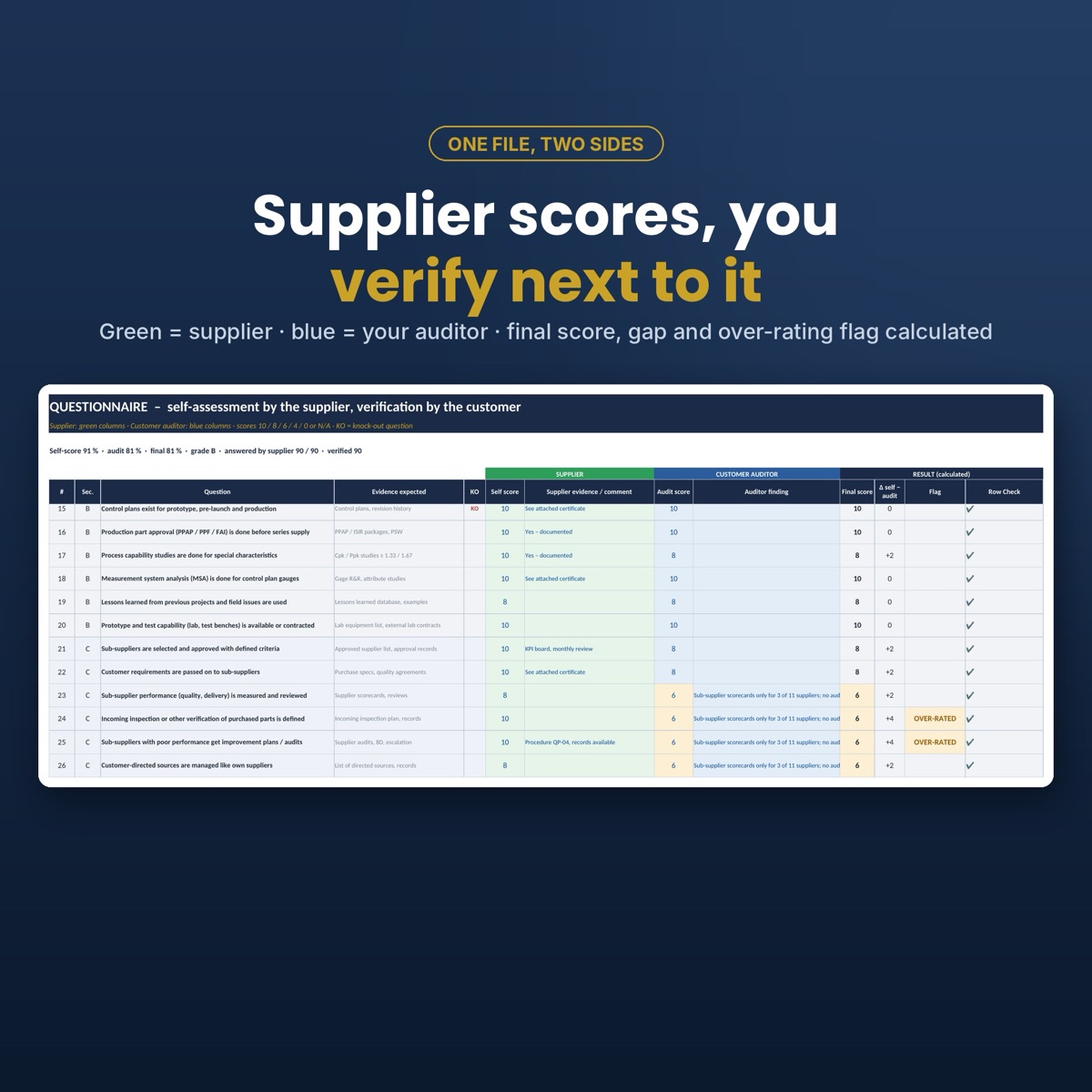
Two sides in one file
The supplier fills the green columns: a score from 10 to 0 and the evidence. Your auditor fills the blue columns next to it on site. The final score, the gap and an over-rating flag are calculated per question, so you see at once where the supplier sees itself better than it is.
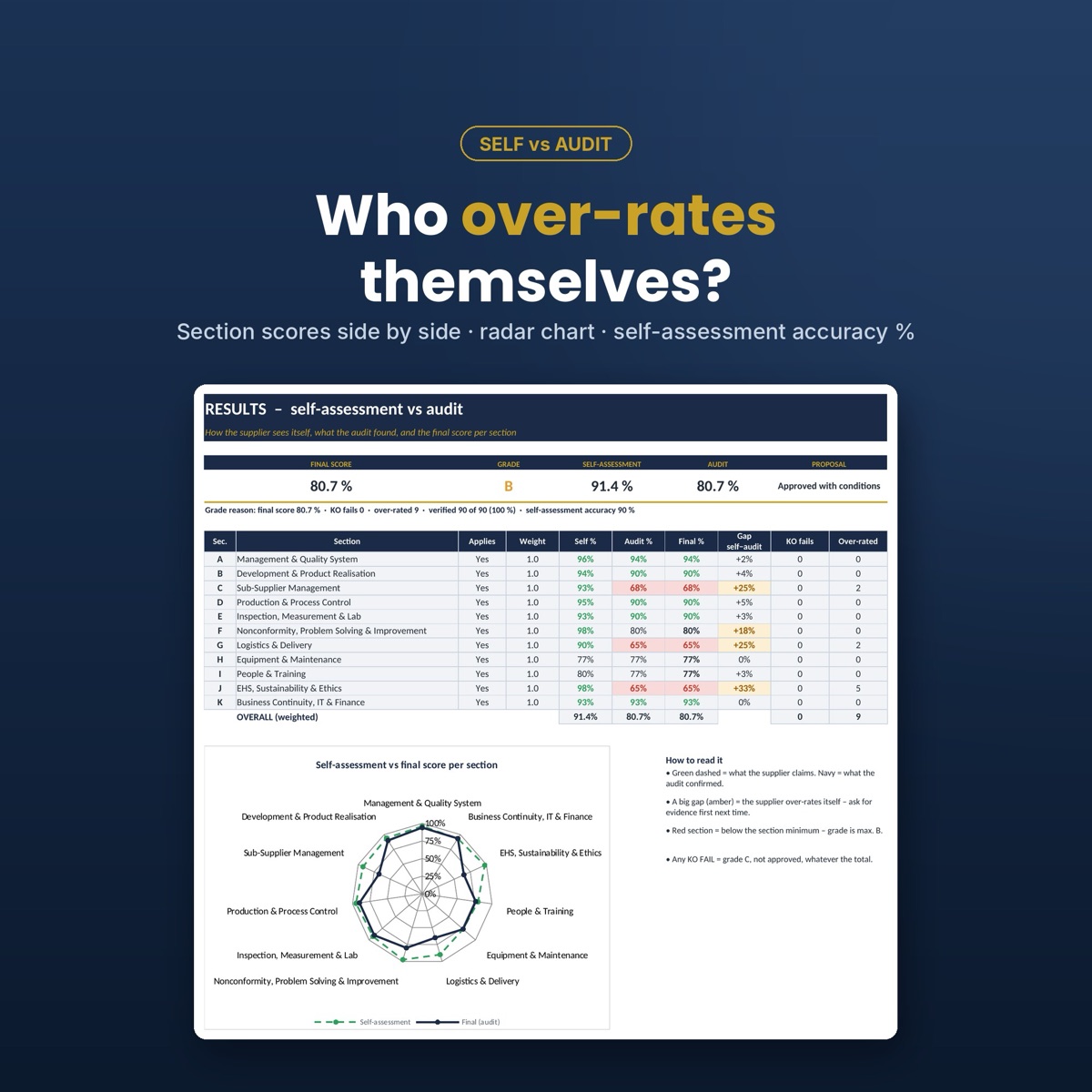
A grade you can defend
Grade A from 90 %, B from 80 %, C below, all editable. A section below 70 % caps the grade at B, and any knock-out question at 4 or less makes it C, not approved. The reason is written next to the grade.
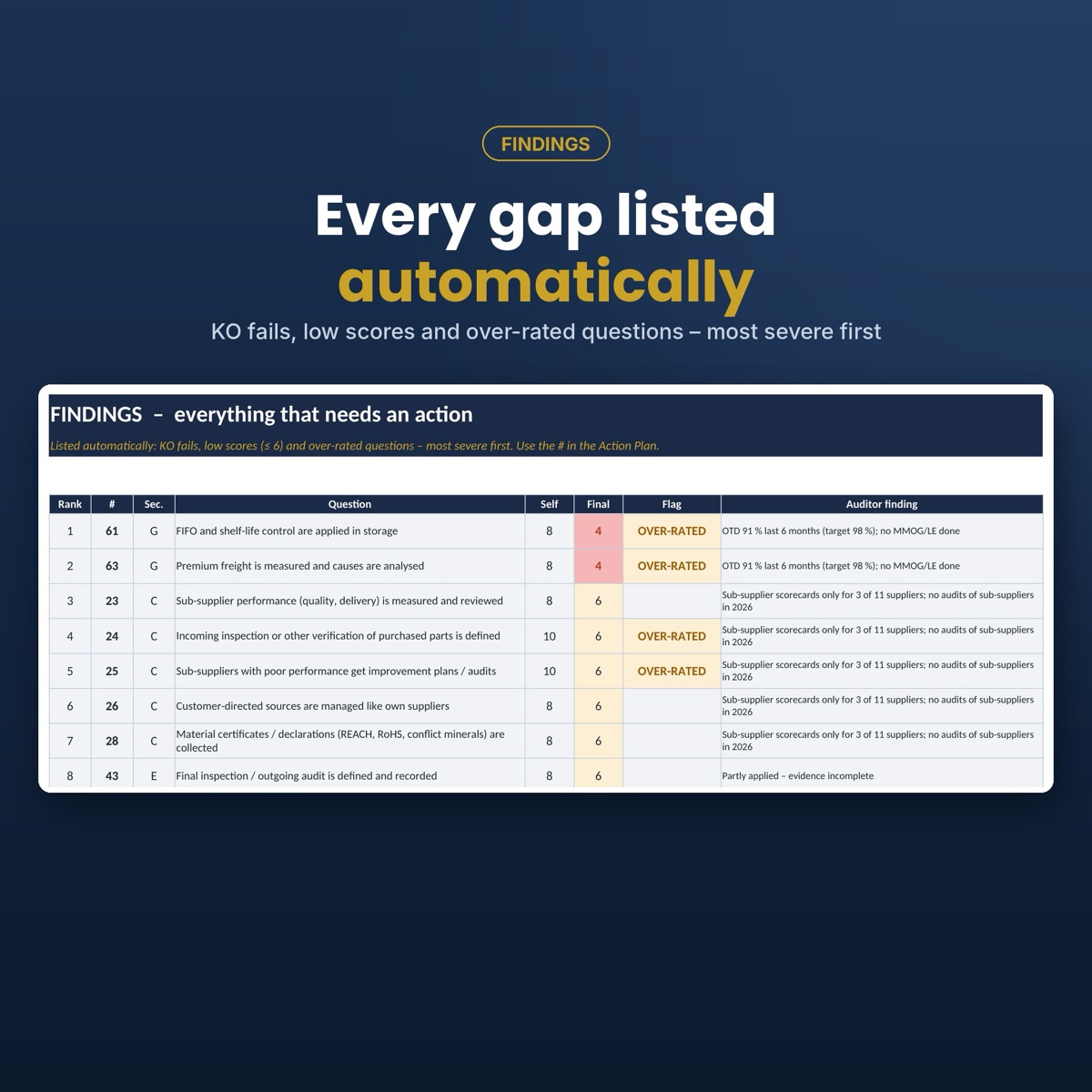
Findings without retyping
Knock-out fails, low scores and over-rated answers are listed automatically, most severe first. Type the question number in the action plan, the supplier adds the action, owner and date, and you mark it verified.
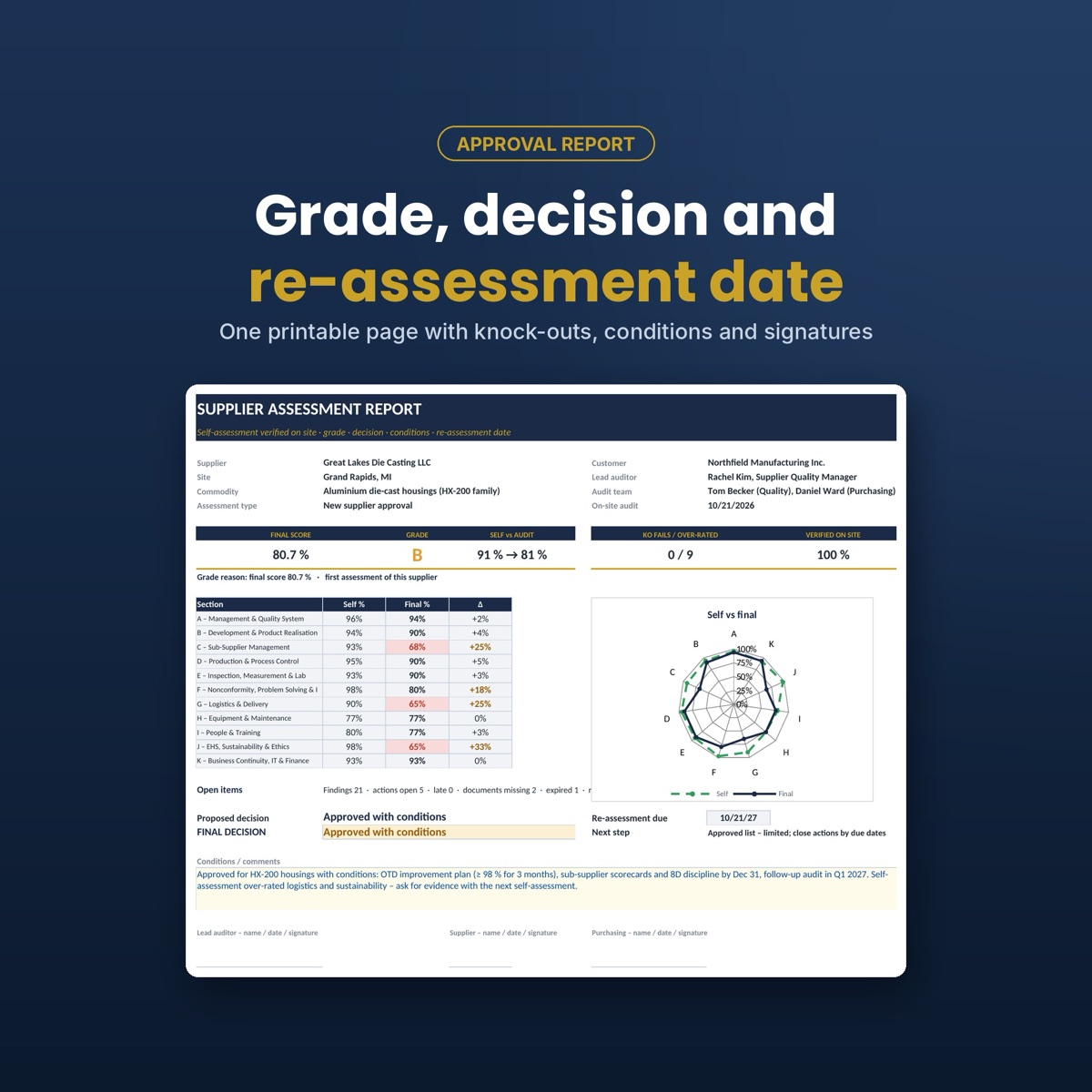
One page for the approval
The approval report shows the score, the grade, self vs final per section, the radar chart, the proposed and final decision, the conditions and the re-assessment date: 36, 12 or 6 months for A, B or C.
The 11 sections
- Management & Quality System
- /templates/supplier-assessment-excel-template/evelopment & Product Realisation
- Sub-Supplier Management
- Production & Process Control
- Inspection, Measurement & Lab
- Nonconformity, Problem Solving & Improvement
- Logistics & Delivery
- Equipment & Maintenance
- People & Training
- EHS, Sustainability & Ethics
- Business Continuity, IT & Finance
Who it is for
- Supplier quality engineers and supplier development teams
- Purchasing managers qualifying new suppliers
- Quality managers working to ISO 9001 8.4 and IATF 16949 8.4.1.2
- Manufacturers in automotive, HVAC, industrial, medical and electronics
Not included
- The official VDA 6.3 questionnaire (the approach is similar to a potential analysis)
- Comparing several suppliers side by side: one supplier per file, use a supplier selection matrix for that
- The text of ISO, IATF or VDA standards
Details
- Format
- Microsoft Excel .xlsx, 2 files (example + blank), 11 tabs
- Works in
- Excel 2010 or newer, Excel 365, Excel for Mac, LibreOffice Calc
- Macros
- None, no add-ins
- Questions
- 90 in 11 sections, 11 knock-outs, 20 rows for your own
- Scoring
- 10 / 8 / 6 / 4 / 0 or N/A, grade A / B / C
- Example
- /templates/supplier-assessment-excel-template/ie-casting supplier, self-assessment + audit, fictional data
Frequently asked questions
›Where do I buy it?
Here on QM Bench with the Buy button: secure card checkout by Polar with a receipt, and both Excel files arrive by e-mail right after payment.
›Which mode should I use?
Self-assessment + audit for a new supplier approval: the supplier scores first, you verify on site. Audit only for a classic audit by your team. Self-assessment only as a quick remote pre-screening before you travel. Switch the mode in Setup.
›What is a knock-out question?
One of 11 questions on essentials that must be in place, marked KO in the questionnaire. If any of them is scored 4 or less, the supplier gets grade C and is not approved, whatever the total score.
›Can I switch sections off?
Yes. For a build-to-print supplier switch off Development & Product Realisation; the score and grade are calculated from the sections that apply. Section weights can be changed too.
›Is it the VDA 6.3 questionnaire?
No. It is an independent questionnaire with a similar potential-analysis approach. For a formal VDA 6.3 audit use the official VDA questionnaire.
›Is there a free version?
The free online supplier capability assessment on QM Bench has 30 questions with a radar chart and a risk class. The Excel template adds the supplier self-assessment, audit verification, knock-outs, documents, findings, action plan and approval report.
›Can I get a refund?
No. It is a digital download: at checkout you agree to immediate delivery and waive the 14-day right of withdrawal, and the files stay with you. If something does not work as described, write to info@qmbench.com and you will get help or a corrected file.
Get the Supplier Assessment: Self-Assessment & Audit
Instant download by e-mail after payment. Paste your measurements and read the verdict.
Buy now · €28.99Or try the free online tool first →